

Just copy the embedded code with ‘iframe’ tag (from youtube, vimeo etc) and past it in your post. Install the plugin and use it as widget. Highlight your video posts with the help of the widget.
Author: WCW

Latest Video
The plugin shows the latest post that contains video embedded with iframe.
Features:
- Shows the latest video embedded with iframe.
- Linked to post title containing the video.
- Linked to category containing the video post.
- Responsive, compatible with small devices.
- Very lightweight.
Installation:
- Upload latest-video-post-widget folder to your /wp-content/plugins/ directory.
- Activate the plugin.
- Activate the Latest Video Post Widget from the ‘Plugins’ menu.
- Add the widget to your sidebar from the ‘Widgets’ design page.
- Configure the widget according to your needs.
Screenshot:
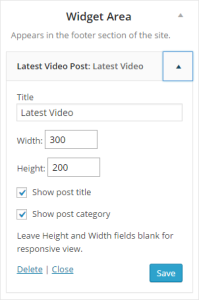

Demo:
Just copy the embedded code with ‘iframe’ tag (from youtube, vimeo etc) and paste it in your post. Install the plugin and use it as widget. Highlight your video posts with the help of the widget.